


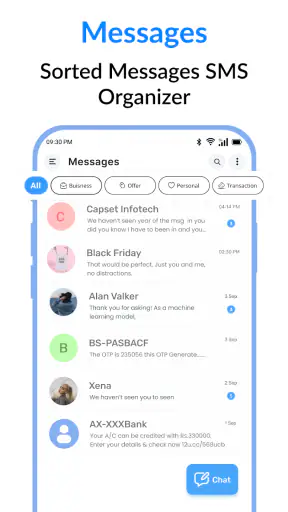
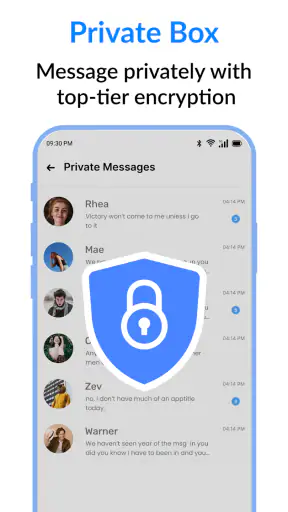
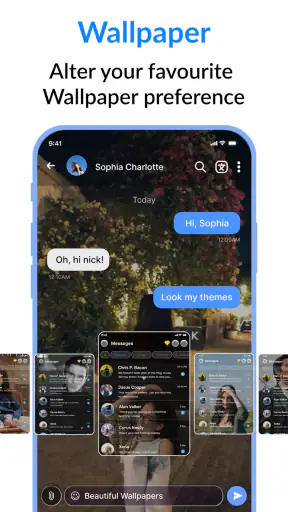

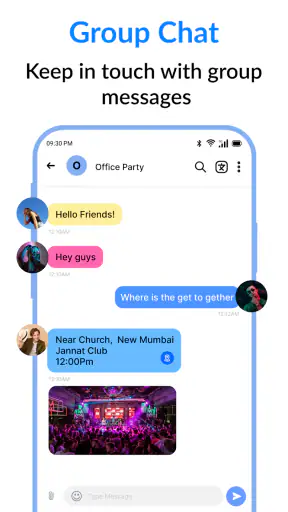
I spent time using Messages: SMS & Private Chat as a straightforward Android communication app, and my first impression was clear: it is built for people who want their everyday texting kept close to the basics. It sits in the communication category, comes from SMS, Messages & Text Messaging, and focuses on sending ordinary text messages rather than trying to become a full social network. That narrow purpose is its main appeal.
The app is free to install, suitable for Everyone, and works on Android devices running version 7.0 or newer. It has passed the point where an app feels untested, with more than a million installs and an average score of 4.0 from roughly fourteen thousand ratings. Those figures suggest a well-established option, although they do not remove the need to decide whether its particular style suits the way you communicate.
In my experience, this is best viewed as a practical replacement or alternative to a phone’s preinstalled messaging tool. It is not the obvious choice for someone who wants a feature-heavy chat platform, a large community, or a service centered on internet-based conversations. It makes more sense for a person who wants an uncluttered place to handle SMS and keep private chats separate from the many distractions found in broader communication apps.
How the everyday messaging workflow feels
The most useful way to judge this app is to imagine a normal day rather than a promotional demonstration. You receive a message from a delivery driver, answer a relative, check an old conversation, and send a short update to a colleague. These are small tasks, but they are exactly where a messaging app earns its place. Messages: SMS & Private Chat is designed around that repeated cycle: open the conversation, read the latest exchange, type a reply, and return to the conversation list.
I like this kind of focused workflow because it does not ask me to create an account for a separate social identity or learn an entirely new communication culture. For ordinary SMS, the recipient’s phone number remains the central point. That makes the app useful when I am contacting people who may not use the same internet messenger as I do. It also makes it suitable for practical messages such as appointment reminders, address changes, quick family updates, and one-time replies.
The private-chat wording is also important when setting expectations. I would use the app for personal conversations that I want to keep in a dedicated messaging space, but I would not automatically treat the word “private” as a guarantee of end-to-end encryption or complete anonymity. Those are technical claims that require specific documentation. My advice is to use sensible habits: avoid putting passwords, payment details, identity documents, or other highly sensitive information into ordinary text messages.
A realistic example is a shared household. I might message someone at home that I am stopping at the supermarket, reply to a school-related update, and later search through a conversation for a previous address. A simple SMS application handles that routine without forcing every participant onto the same platform. The trade-off is that the experience remains tied to the strengths and weaknesses of standard texting, including the fact that the other person’s device and mobile service still affect delivery.
That distinction separates this app from internet-first alternatives. Apps such as WhatsApp, Signal, Telegram, or Messenger can offer richer media conversations and platform-specific features, but they generally depend on both people using the same service. This app’s SMS focus is more universal for basic contact, while its conversation experience may feel less ambitious than a dedicated internet messenger.
What I would do before making it my default
I would not switch my default messaging app immediately after installation. First, I would open several existing conversations, send a harmless test message to a trusted contact, and check whether incoming replies appear as expected. I would also confirm that the app is comfortable with the phone’s notification behavior. A messaging app can look excellent on screen and still become frustrating if alerts are delayed, muted, or duplicated by another SMS application.
Making it the default is a practical decision rather than a permanent commitment. If another SMS app remains active, I would expect confusion about which app handles new messages. Repeated notifications, split conversation histories, or uncertainty about where a reply was sent can quickly outweigh the benefit of a cleaner interface. I recommend choosing one primary SMS application and disabling unnecessary duplicate alerts in the other one.
Before relying on it for important conversations, I would also check whether the contacts and threads I use most often are easy to identify. A short test is more useful than assuming every phone treats third-party messaging apps in exactly the same way. Android manufacturers can arrange notification controls, default-app settings, and battery restrictions differently, so the first setup deserves a few minutes of attention.
The current version is 2.4.6, and the app was released on July 28, 2023. I mention those details because compatibility matters with a communication tool: older phones can behave differently from newer ones, and an app that supports Android 7.0 or later covers a broad range of devices. Still, I would keep the operating system updated where possible and review the app after major phone updates rather than assuming the setup will never need attention.
Settings that deserve a deliberate check
Experienced users usually get more from a messaging app by checking settings before they need them. In this case, I would start with notifications. Decide whether message previews should appear on the lock screen, whether sound is appropriate, and whether vibration is useful or distracting. A preview can save time when a message is harmless, but it can also expose personal content to anyone who sees the phone.
I would then review which application is assigned to manage SMS. This is one of the most important settings because it determines where new messages arrive and which app is allowed to handle replies. If Messages: SMS & Private Chat is only being tested, I would leave the existing arrangement clear and temporary. If I decide to keep it, I would make one deliberate change instead of allowing two apps to compete.
Another useful habit is separating notification urgency from conversation importance. Not every text deserves an immediate interruption. For example, a promotional message can wait, while a family contact may need a visible alert. If the app or the phone allows conversation-specific notification control, I would use it selectively rather than making every thread loud. This keeps the app useful during work, travel, or sleep.
Privacy settings deserve equal attention. I would consider whether message previews should be hidden when the phone is locked, especially if the device is shared or often placed on a desk. I would also review permissions shown by Android and grant only what is necessary for the intended use. The exact permission experience can vary by phone and operating-system version, so I prefer checking the system page directly instead of assuming that every device presents the same choices.
The app includes in-app purchases ranging from $2.99 to $49.99 per item. Since the basic app is free, I would explore the free experience first and avoid paying simply to solve a problem I have not actually encountered. I would also check the purchase screen carefully before confirming anything, particularly if I am setting up the app on a family member’s phone. The sensible approach is to judge the core texting workflow on its own merits before considering optional spending.
Repeatable patterns that make texting quicker
The biggest speed improvement comes from reducing unnecessary decisions. I keep the conversation list organized mentally by purpose: active personal chats, practical one-off messages, and threads I may need to revisit. When I receive a message that only needs a short answer, I reply immediately rather than leaving it to become part of a growing backlog. That habit matters more than constantly searching for extra features.
I also use the phone’s keyboard shortcuts and text suggestions instead of typing the same phrases repeatedly. Addresses, meeting confirmations, and simple acknowledgments can be prepared through the keyboard’s own tools. This is not a special function of the app, but it works well with a focused SMS workflow and avoids assuming that the messaging application itself includes a feature that may not be present.
For recurring tasks, I create a small personal routine. I read the newest message, verify the recipient before sending, check whether the reply needs an attachment, and then return to the thread list. That last check prevents a common mistake: answering the right words in the wrong conversation. It is especially helpful when several chats have similar names or when messages arrive close together.
Search is another area where a repeatable habit helps, if the phone and app expose the expected conversation-search controls. When I need an old detail, I begin with a distinctive word rather than scrolling through months of messages. I would not rely on memory alone for addresses, times, or instructions. If a detail is important, I confirm it in the original conversation before acting on it.
For group communication, I would keep messages short and explicit. SMS group behavior can depend on the device, carrier, and recipient setup, so I would not assume that a group thread behaves exactly like an internet chat room. If a conversation requires reactions, shared media, live status, or reliable group administration, I would move it to a service designed for those purposes instead of forcing this app to act like one.
Where the simple approach reaches its limits
The app’s main limitation is also its identity: it is centered on text messaging. If my daily conversations depend on voice notes, large files, animated reactions, rich group tools, desktop continuity, or extensive multimedia sharing, I would probably prefer a more specialized internet messenger. A clean SMS tool can be dependable for short messages while still feeling basic beside services built around constant online chat.
There is also a difference between app-level convenience and network-level capability. The application can provide a place to compose and read messages, but it cannot guarantee that every recipient has the same interface, the same notification behavior, or the same support for richer message formats. For important communication, I would confirm that the other person actually received the message rather than treating a sent state as proof of a completed conversation.
Privacy is another area where I would be careful. A private-looking chat screen is not the same thing as a secure messenger with a clearly documented encryption model. If I were discussing confidential work, health matters, financial information, or anything that could cause harm if exposed, I would choose a service whose security properties are specifically documented and understood by everyone involved.
Cost can become a consideration too. The free starting point is attractive, but the presence of optional purchases means I would pay attention to what is included before building my routine around a paid convenience. I would not assume that every customization or enhancement is necessary. For many people, the free messaging workflow will be the real test: if it is not comfortable without extras, purchasing more may not fix the underlying mismatch.
Some users should skip this app altogether. I would look elsewhere if I needed a messenger that works primarily over Wi-Fi, supports a large community, offers strong cross-device synchronization, or provides advanced collaboration features. It is also not my first recommendation for someone who wants a single platform for calls, media sharing, channels, and group management. The narrower SMS approach is valuable precisely because it does not try to cover every communication style.
My final view after using it as a daily tool
My verdict is favorable, but deliberately limited. Messages: SMS & Private Chat is a sensible option for Android users who want a dedicated place for ordinary texting and personal conversations. It is free, rated Everyone, and has enough adoption to feel like a serious alternative rather than an obscure experiment. The developer name, SMS, Messages & Text Messaging, makes its purpose unusually clear: this is about messages first.
The strongest reason to choose it is focus, not a long feature checklist. I would recommend it to someone who wants to replace an uncomfortable default SMS interface, keep everyday texts in one clear location, and avoid requiring every contact to install the same internet service. It is particularly practical for family communication, basic coordination, and contacts who may use different phones or messaging platforms.
I would begin with a small trial, check notifications and default-app behavior, send a few test messages, and only then decide whether to make it the main SMS handler. I would keep lock-screen previews under control, avoid sending sensitive information through ordinary texts, and use a different service when a conversation needs richer media or stronger documented privacy.
After that setup, the app becomes easy to judge: if your communication is mostly short, direct, and phone-number based, its simplicity can feel refreshing. If your expectations are shaped by full-featured online chat, its boundaries will appear quickly. For my own use, that makes it a good focused tool rather than a universal messenger. I would gladly recommend it to the right person, but I would not recommend choosing it simply because it is free or because it resembles a broader chat platform.
In short, Messages: SMS & Private Chat works best when I treat it as a dependable SMS workspace and build a few careful habits around it. The app does not need to imitate every alternative to be useful. Its value comes from handling the everyday messages that still matter, while making it clear when a more specialized communication service is the better fit.


